
Gather the mailbox facts
Have the provider, mailbox address, applicant details, and IDs ready.
1583 Pro is a private service operated by Notary Geek, a GoodWare LLC brand. We are not a government office or USPS. About the operator and sources
Start with the mailbox provider, mailbox address, applicant details, and IDs. The wizard shows the form flow before any paid notary step and keeps the identity check after submission.
Already started or rejected? Get support.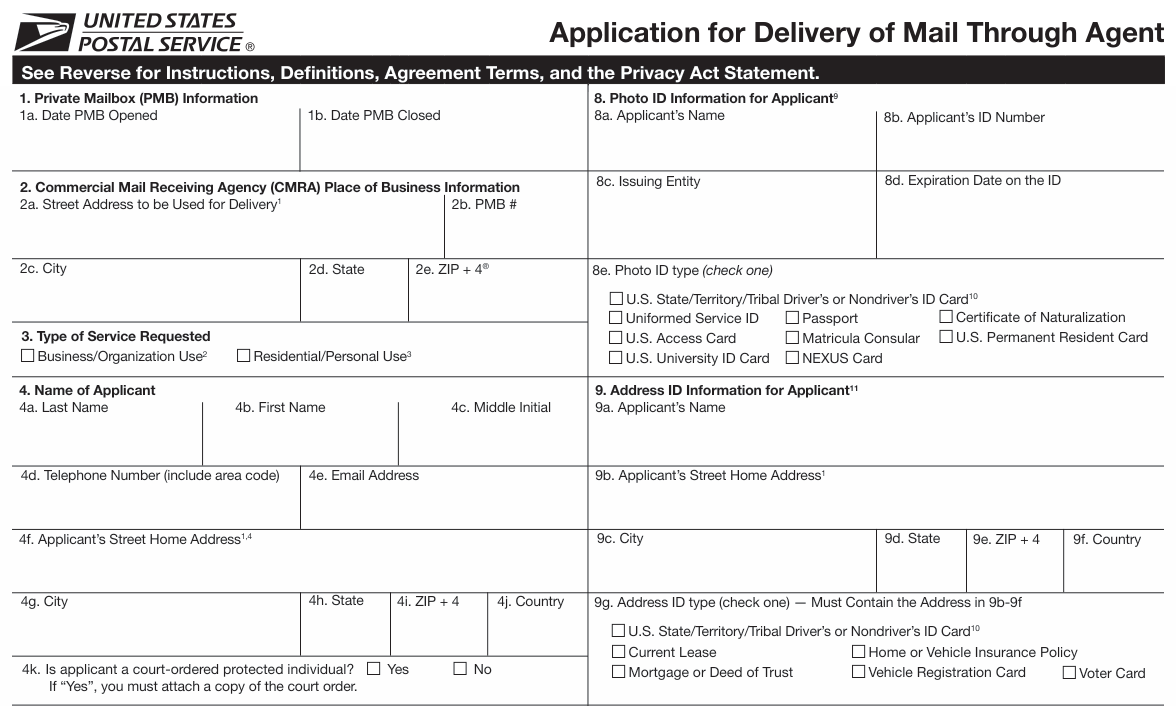
Have the provider, mailbox address, applicant details, and IDs ready.
The wizard organizes the answers and creates the form.
After submission, continue through the identity step and follow the mailbox provider’s instructions.
Address first
Before notarizing USPS Form 1583, confirm what kind of mailbox or address service your provider or receiving party wants. A virtual mailbox, registered-agent address, business-address product, and residential-style address proof are not the same thing.
Notary Geek does not act as your lawyer, tax adviser, mailbox provider, registered agent, or business-formation company. We can explain the notary and document workflow, but you are responsible for confirming that the address service fits your provider, bank, agency, marketplace, or receiving party.
Review this category if you need mail receiving, scanning, forwarding, or an ordinary mailbox account before Form 1583.
Review mailbox options Business addressReview this category if the issue may involve business-address documentation, lease-style address support, or business verification.
Review TruLease Residential-style addressReview this category if the address concern is personal or residential-style proof rather than ordinary mailbox receiving.
Review TruResidenceNotary Geek may receive a referral credit if you click and later sign up through these links. A referral link is not an endorsement of the provider's pricing, fees, policies, uptime, security, suitability, address acceptance, or fit for your use case. These links are service categories to review, not legal, tax, banking, residency, mailbox-provider, registered-agent, hosting, cybersecurity, IT, or business-formation advice. Confirm directly with the provider and the party requesting the document before relying on any address, mailbox, hosting, or related service.
How it works
The form is easier when the mailbox address, provider instructions, applicant type, address details, and ID details are collected in order. Start with the wizard for normal process questions. Use support when there are exact provider instructions, a rejection, signer-location issues, or a form that truly does not fit.
Confirm what your provider or receiving party requires, then come back with the mailbox or address details before using the wizard.
Enter the mailbox provider, applicant, address, and ID details so the USPS 1583 form can be created from structured answers instead of hand-typed from scratch.
If the provider requires notarization, rejects the form, or gives confusing instructions, support is most useful when you have the exact provider wording ready.
What often comes next
USPS Form 1583 is often the first step around mailbox setup, business formation, or international document plans. If the next task turns into notarization, apostille, certified copies, or legalization, Notary Geek can help with that too.
1583 Pro stays focused on USPS Form 1583. When the job expands into apostille or other document handling, the same Notary Geek team can keep the process moving.
Official source
The wizard is the practical form-building layer. The official USPS form and CMRA guidance remain the source links to check when a provider instruction or form field is unclear.
Start form
Use the form after you have the mailbox address or provider instructions ready. The wizard opens as its own full page and continues to the identity check after submission. If you are still learning the process, the wizard is still the right first step because it shows the flow without starting a paid session.
The form opens full-page. After submission, the next screen is the identity document check.